
JNR Mega Box 25000: Excel template to split long supplier flavour lists into orderable SKU lines (ES/IT)
Sam ·
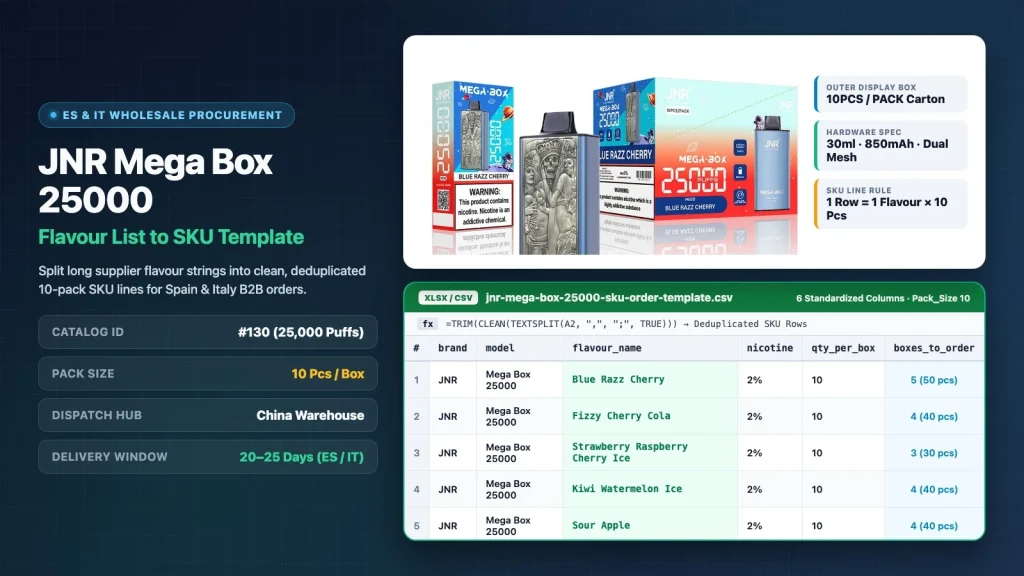
Wholesale vape buyers in Spain and Italy often hit a formatting bottleneck when preparing restock sheets for high-capacity models: product pages and supplier quotes sometimes present 20–30+ flavours as a single continuous paragraph with mixed commas, semicolons, slashes or numbered items. Using a standardized JNR Mega Box 25000 split flavour list to SKU template converts that unsplit text block into clean, deduplicated, box-level purchase rows before you submit an order for China warehouse dispatch.
Because the JNR Mega Box 25000 Puffs (Catalog ID 130) ships in fixed 10-piece display cartons (pack_size 10) and typically moves on a 20–25 days delivery window from the China warehouse, each line on your purchase order must correspond to a single verified flavour name and a whole-box multiplier. Below you will find a 6-column Excel/CSV template, three fast splitting methods (Text to Columns, dynamic formulas, and regex), and an alias deduplication reference tailored for Spanish and Italian B2B procurement teams.
Why long flavour strings delay JNR Mega Box 25000 orders in Spain and Italy
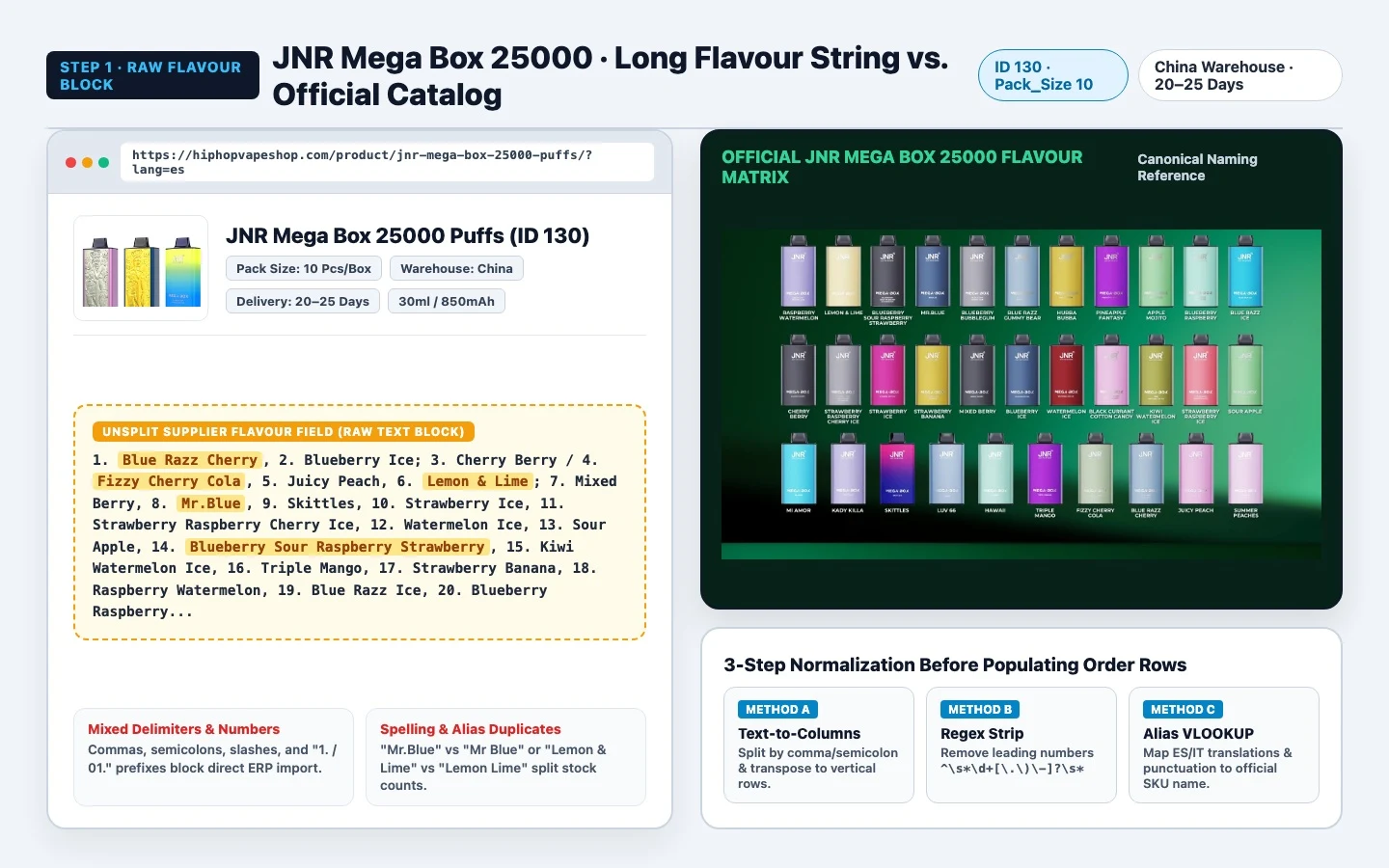
When you view the JNR Mega Box 25000 product page or copy a supplier flavour paragraph, buyers see a broad flavour line-up built around a 30 ml e-liquid chamber, an 850 mAh Type‑C rechargeable battery and a dual mesh coil / dual‑core system. While a long flavour catalog helps retail shops test local preferences in Madrid, Barcelona, Milan or Rome, pasting a raw paragraph of flavours directly into a spreadsheet or message causes three frequent procurement errors:
1. Unsplit multi‑flavour cells: several flavours on the same row prevent warehouse picking systems from assigning exact 10‑piece carton quantities per SKU.
2. Numbering and delimiter noise: supplier strings often include sequence numbers (e.g. "1.", "02)"), slashes and semicolons that break automated ERP or POS CSV imports.
3. Bilingual and punctuation aliases: Spanish and Italian managers often mix local shorthand with English catalog names—e.g. "Mr.Blue" vs "Mr Blue" or "Manzana Ácida" / "Mela Acida" vs "Sour Apple"—which leads to accidental duplicate box allocations.
6-column Excel / CSV template structure for pack_size 10 SKUs
To avoid retyping and ensure compatibility with China warehouse packing lists, structure your spreadsheet with these six fixed columns: brand, model, flavour_name, nicotine, qty_per_box, boxes_to_order. Locking qty_per_box to 10 guarantees every integer in boxes_to_order maps to sealed 10‑unit display cartons.
Column header | Data format | Fixed / variable rule for ID 130 | Example cell value
brand | Text | Fixed brand identifier | JNR
model | Text | Fixed model identifier (Catalog ID 130) | Mega Box 25000
flavour_name | Text | Single canonical flavour per row (deduplicated) | Blue Razz Cherry
nicotine | Text / percentage | Specify strength (typical EU wholesale example: 2%) | 2%
qty_per_box | Integer | Locked to 10 (pack_size 10 per display box) | 10
boxes_to_order | Integer | Whole cartons ordered (1 box = 10 pcs) | 4
Copy and save the CSV block below as jnr-mega-box-25000-sku-template.csv and open directly in Excel, Google Sheets or LibreOffice Calc:
brand,model,flavour_name,nicotine,qty_per_box,boxes_to_order
JNR,Mega Box 25000,Blue Razz Cherry,2%,10,4
JNR,Mega Box 25000,Blueberry Ice,2%,10,3
JNR,Mega Box 25000,Cherry Berry,2%,10,2
JNR,Mega Box 25000,Fizzy Cherry Cola,2%,10,3
JNR,Mega Box 25000,Juicy Peach,2%,10,2
JNR,Mega Box 25000,Lemon & Lime,2%,10,2
JNR,Mega Box 25000,Mixed Berry,2%,10,2
JNR,Mega Box 25000,Mr.Blue,2%,10,2
JNR,Mega Box 25000,Skittles,2%,10,1
JNR,Mega Box 25000,Strawberry Ice,2%,10,3
JNR,Mega Box 25000,Strawberry Raspberry Cherry Ice,2%,10,2
JNR,Mega Box 25000,Watermelon Ice,2%,10,3
JNR,Mega Box 25000,Sour Apple,2%,10,1
JNR,Mega Box 25000,Blueberry Sour Raspberry Strawberry,2%,10,2
JNR,Mega Box 25000,Kiwi Watermelon Ice,2%,10,2
JNR,Mega Box 25000,Triple Mango,2%,10,2
JNR,Mega Box 25000,Strawberry Banana,2%,10,2
JNR,Mega Box 25000,Raspberry Watermelon,2%,10,2
JNR,Mega Box 25000,Blue Razz Ice,2%,10,2
JNR,Mega Box 25000,Blueberry Bubblegum,2%,10,1
Three practical methods to split long supplier flavour strings into SKU rows
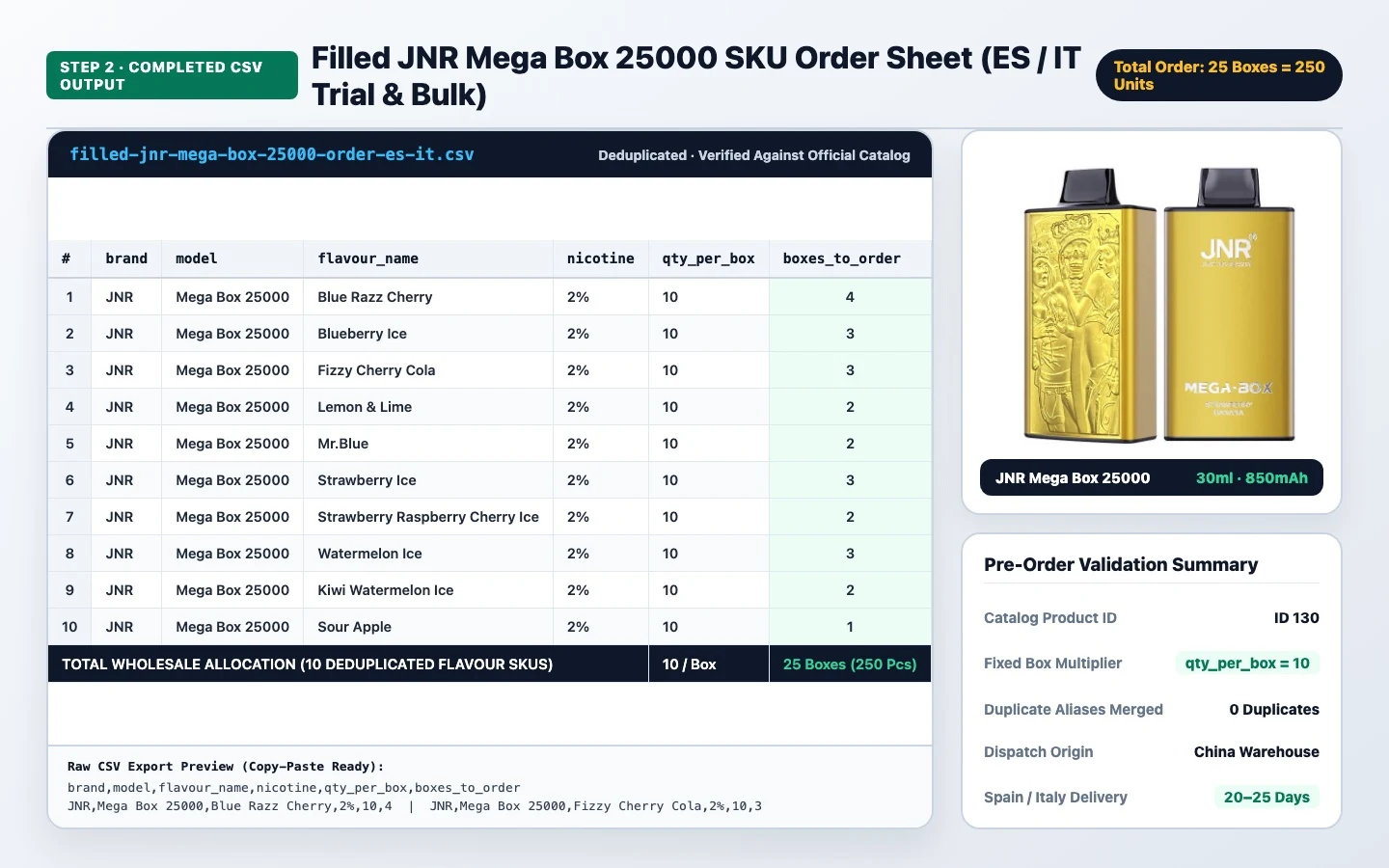
Whether a supplier sends a 29+ flavour string inside one spreadsheet cell or you copy the block from the product page, use one of these workflows to isolate one flavour per row in under two minutes.
### Method 1 — Excel Text to Columns + Paste Transpose (no formulas)
1. Paste the raw flavour string into A1 on a blank worksheet.
2. Select A1 → Data > Text to Columns → Delimited. Check Comma and Semicolon; add "/" under Other if needed. Finish to split across columns (A1:AD1).
3. Copy the horizontal range, right‑click cell C2 under flavour_name in your template, and Paste Special > Transpose.
4. Use Find & Replace (Ctrl+H) to remove leading numbers and extra spaces, then fill JNR in column A, Mega Box 25000 in column B, 2% in column D and 10 in column E.
### Method 2 — Excel 365 / Google Sheets dynamic split
If you use Excel 365 or Google Sheets you can split, trim and stack a raw flavour string vertically in a single formula.
– Excel 365 example: =TRIM(TEXTSPLIT(A1, , {",",";","/"}, TRUE))
– Google Sheets example: =ARRAYFORMULA(TRIM(TRANSPOSE(SPLIT(A1, ",;/"))))
To automatically strip leading item numbers in Google Sheets, wrap with REGEXREPLACE:
=ARRAYFORMULA(REGEXREPLACE(TRIM(TRANSPOSE(SPLIT(A1, ",;/"))), "^d+[.)-s]+", ""))
### Method 3 — Regex replacements in VS Code or Notepad++
For cleaning multi‑line PDF or WhatsApp flavour lists before importing to CSV:
1. Paste the raw paragraph into a plain text editor with regex enabled.
2. Find [,;/]s* and replace with n to place each flavour on its own line.
3. Find ^s*d+[.)-]?s* and replace with an empty string to remove sequence numbers.
4. Find ^(.*)$ and replace with JNR,Mega Box 25000,$1,2%,10,1 to generate a ready CSV with a default 1‑box allocation per flavour.
Common flavour alias deduplication table (EN / ES / IT)
Before finalizing boxes_to_order, cross‑check your sheet against this alias table so you avoid ordering the same SKU twice under different spellings.
Canonical flavour_name | Common English variants | Common Spanish / Italian aliases | Deduplication rule
Blue Razz Cherry | Blue Razz & Cherry; Blue Raspberry Cherry; ME02 Blue Razz Cherry | Frambuesa Azul Cereza (ES) / Lampone Blu Ciliegia (IT) | Merge all into Blue Razz Cherry
Fizzy Cherry Cola | Cherry Cola Ice; Fizzy Cola Cherry; Sparkling Cherry Cola | Cola de Cereza Con Gas (ES) / Cola Ciliegia Frizzante (IT) | Merge into Fizzy Cherry Cola
Lemon & Lime | Lemon Lime; Lemon and Lime; Lemon + Lime | Limón y Lima (ES) / Limone e Lime (IT) | Standardize to Lemon & Lime
Mr.Blue | Mr Blue; Mr. Blue; Mister Blue | Mr Blue Bayas Mixtas (ES) / Mr Blue Frutti Blu (IT) | Normalize to Mr.Blue
Strawberry Raspberry Cherry Ice | Straw Razz Cherry Ice; Strawberry Raspberry Cherry | Fresa Frambuesa Cereza Ice (ES) / Fragola Lampone Ciliegia Ice (IT) | Keep full 4‑word ice name distinct from shorter variants
Blueberry Sour Raspberry Strawberry | Blueberry Sour Razz Straw; Blue Sour Razz Strawberry | Arándano Frambuesa Ácida Fresa (ES) / Mirtillo Lampone Acido Fragola (IT) | Keep the full 4‑word name; do not truncate
Sour Apple | Green Apple Sour; Sour Green Apple; ME01 Sour Apple | Manzana Ácida (ES) / Mela Verde Acida (IT) | Merge into Sour Apple (distinct from other apple blends)
Kiwi Watermelon Ice | Kiwi Watermelon; Watermelon Kiwi Ice | Kiwi Sandía Hielo (ES) / Kiwi Anguria Ghiaccio (IT) | Merge into Kiwi Watermelon Ice
Plan China warehouse lead times (20–25 days) with clean SKU sheets
Because JNR Mega Box 25000 wholesale orders dispatch from the China warehouse with a 20–25 days delivery cycle to mainland Spain and Italy, submitting a clean, line‑by‑line CSV on Day 1 protects your restock calendar. When warehouse staff receive a validated 6‑column table where every flavour matches the official carton label and every quantity is a multiple of 10, orders move straight to carton picking without 24–48 hours of clarification.
For additional wholesale checklists, carton planning and multi‑flavour inventory workflows, see our Buying Guides before you submit the next Spain or Italy restock sheet.
Links included in this article:
– JNR Mega Box 25000 product page (EN) — internal product details and full flavour list
– Buying guides — wholesale ordering reference and checklists